
How to review a shopping receipt and update your pantry
A receipt tells you what you paid, but its abbreviations do not always explain how much you bought. Review the document before recording the expense or turning its lines into pantry stock.
1. Check your stock before shopping
Look through the pantry, fridge and meals you have planned. List what is missing and the quantities needed for the people eating at home. A list based on what you already have helps avoid duplicate purchases; it does not guarantee fixed savings or replace checking the shop’s prices.
2. Take a readable photo or enter the receipt
Capture the whole receipt in good light, without creases hiding the amounts. Crop or cover personal details that are not needed. DietaGo lets you enter a receipt manually for free or read it with AI, with the cost shown beforehand. Automated reading still requires you to review the data.
3. Check amounts and discounts
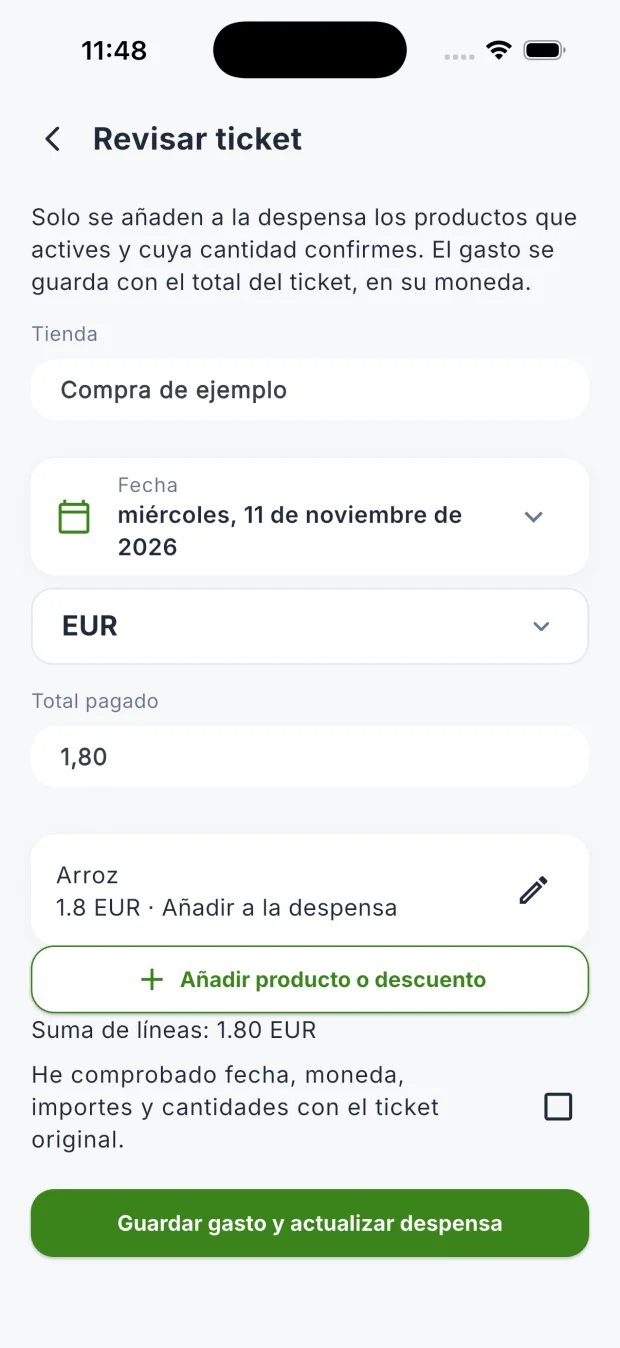
Compare the shop, date, currency and total paid with the original. Check the amount for each complete line, not just the unit price. For example: €4 + €3 − a €1 discount = €6. Do not add the total as another purchase; check differences caused by discounts, taxes or missing lines.
4. Confirm quantities for the pantry
Select only the products you want to add, then enter their actual quantity and unit. Two packages do not automatically mean 2 kg: read the quantity on the label. Discounts are expense adjustments, not food. You can save a line only as an expense without adding it to your pantry.
5. Save and check the result
Confirm your review and save the receipt. Spending uses the reviewed total in its currency; the pantry receives the items you selected and confirmed. Check both results before entering the same shopping trip again. Recorded spending and a meal plan’s estimated budget are different types of information.
Sources and scope
Usage guide written by the DietaGo team using the sources listed. It explains logging and organisation; it does not replace individual nutrition advice or imply clinical review.
Try these features in DietaGo
No subscription. Everyday use is free; AI features use coins.